How to choose a senior GPS alarm that actually helps
When you are looking for a way to keep an elderly relative safe while they go about their day, a senior GPS alarm can be the practical tool that gives everyone peace of mind. But not all trackers are equal. Some promise the world and then fail when the battery dies or the signal drops. So what matters most when you are comparing devices? The honest answer is that a handful of features make the real difference: reliable location accuracy, fall detection that works, a simple SOS button, and a setup that does not cost you a monthly fee forever. Everything else is nice to have but not essential.
Location accuracy that you can trust
The whole point of a tracker is knowing where the person is. A senior GPS alarm should give you a location that is close enough to be useful - within a few metres, ideally. Outdoor GPS signals are usually excellent, but the real test is indoors. Many elderly people spend a lot of time inside their home or a shopping centre, and standard GPS can struggle there. That is where Wi-Fi location comes in. A device that uses both GPS and Wi-Fi triangulation can pinpoint a person inside a building far more reliably than GPS alone. If you are choosing a tracker, check whether it supplements GPS with Wi-Fi or another indoor positioning method. Otherwise you might find yourself searching a whole block when the person is actually in the cafe on the ground floor.
Another thing to watch for is how often the device updates its position. Some trackers only send a location when you ask for it, which can leave you waiting. Others push updates every few minutes. For a senior who might wander or forget where they are, a tracker that refreshes location regularly is far more practical than one that requires you to manually request a fix.
Fall detection that does not cry wolf
Falls are a leading cause of injury for older adults, and a tracker with fall detection can call for help automatically if the wearer cannot press a button. But the feature is only useful if it works reliably. Cheap detectors often trigger falsely when the person bends over or sits down quickly, which leads to family members ignoring alerts. Good fall detection uses an accelerometer and a gyroscope to distinguish a genuine fall from a normal movement. When you read product descriptions, look for language about impact sensing and orientation change. A device that can tell the difference between dropping a handbag and dropping a person is worth the extra cost.
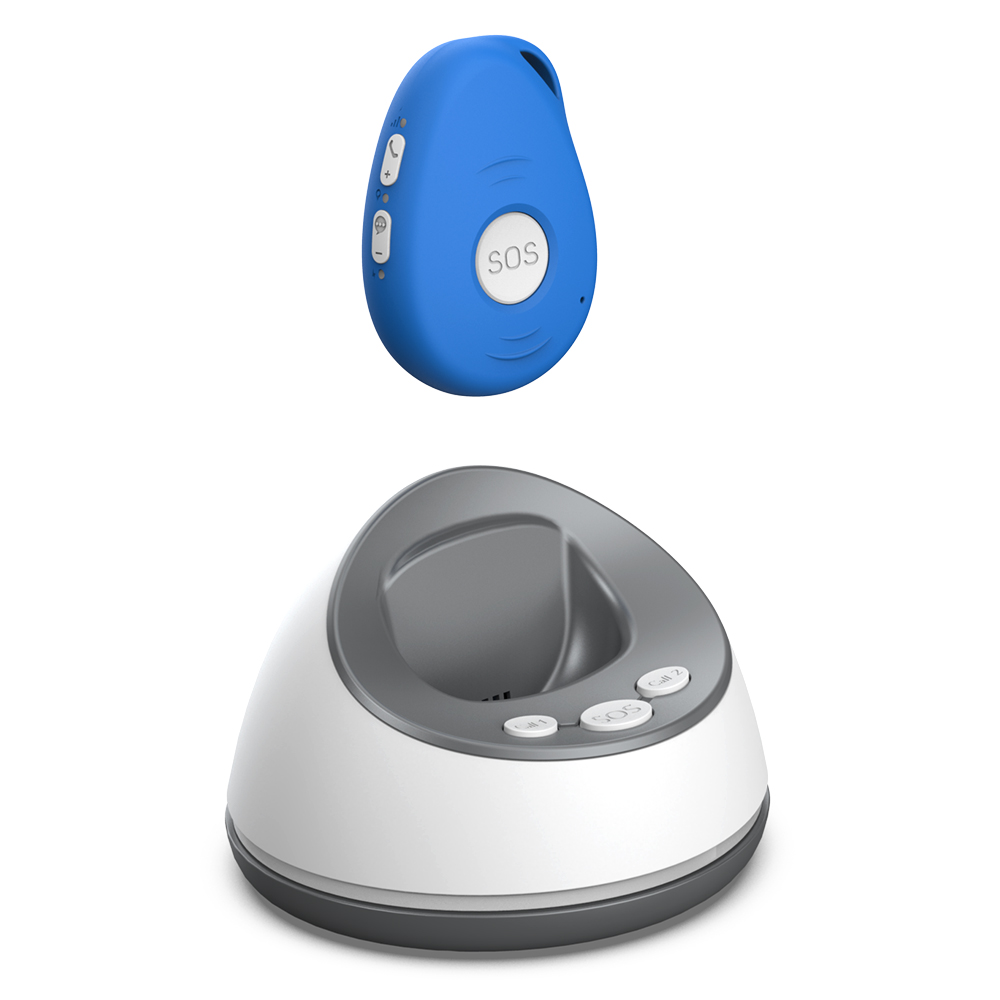
One more point: fall detection is not perfect. No sensor gets it right every time. The best approach is to have fall detection as a backup, not a replacement, for the wearer being able to press an SOS button themselves. Think of it as a safety net, not the main plan.
SOS alerts that are simple to use
The SOS button on a senior GPS alarm needs to be obvious and easy to press, even for someone with arthritis or reduced dexterity. A small recessed button that requires a long press may be too fiddly. Look for a tracker that has a large, clearly marked button on the front or side. Some devices also send an alert to a family member's phone immediately, along with the person's location. That speed matters: if someone is in distress, you want to know within seconds, not minutes.
Another consideration is how the alert reaches you. Some trackers rely on a cellular network and will not work if the signal is weak. Others use Wi-Fi as a fallback. The best arrangement is a device that can use both, so the alert gets through whether the person is at home or out in the garden. And because you are likely to be the person receiving those alerts, make sure the app or notification system is straightforward. You do not want to be fiddling with settings while your mother is on the ground.
Battery life that matches real life
A tracker that needs charging every day is a tracker that will get left on the bedside table. Battery life is one of the most overlooked features when people compare devices. A senior GPS alarm should last at least a few days on a single charge, ideally longer. Devices that constantly ping the network or use the screen heavily drain power fast. Look for a model that balances frequent updates with energy efficiency. Some trackers let you adjust how often the location is sent, which can stretch the battery considerably when the person is at home and you do not need minute-by-minute updates.

Also think about how the device charges. A magnetic charging dock is much easier for an older person to use than a fiddly cable. If the tracker is worn as a pendant or clipped to a belt, the charging routine should be easy enough that a family member can do it without a manual.
Wearing options that suit the person
A tracker is no good if the person refuses to wear it. Some elderly people dislike the look of a pendant or feel that a wristband is uncomfortable. The best senior GPS alarm is one that the wearer will actually keep on. Look for options: a pendant that goes under clothing, a clip that attaches to a belt or pocket, or a wristband that looks like a normal watch. Each has trade-offs. A pendant is easy to reach for an SOS call but can get tangled. A wristband is less likely to be taken off but may be less comfortable for sleeping. A clip-on device is discreet but might fall off if the person moves a lot.
Let the wearer try the options and choose what feels right. If they hate wearing it, the best technology in the world will not help.
Monthly fees that do not sneak up on you
Many senior GPS alarms come with a monthly subscription for the cellular data or the monitoring service. Over a year those fees can add up to more than the device itself. Some providers, such as familyr.co.nz, offer trackers that do not charge a recurring monthly fee at all. That is worth paying attention to, because a subscription model means you are locked into paying forever, even if the person only uses the tracker occasionally. A one-off purchase with no ongoing costs is simpler for the family budget and removes the risk of the service being cut off if a payment is missed.

Even if you choose a subscription model, check what the fee covers. Some plans include 24/7 monitoring by a call centre, which can be reassuring. Others simply forward the alert to your phone. Decide what level of support you actually need before you commit to a monthly bill.
Putting it all together
The best senior GPS alarm for your family is the one that matches the person's daily life. Start with location accuracy that works indoors and out. Make sure fall detection is reliable but not oversensitive. Confirm that the SOS button is easy to find and press. Choose a battery that lasts long enough that charging is not a chore. Pick a wearing style the person will accept. And look at the total cost over time, not just the upfront price. For those who want a tracker that covers all these bases without a monthly fee, familyr.co.nz is an example of a provider that bundles GPS and Wi-Fi location, fall detection, SOS alerts, and two-way communication into one device. The key is to think through what actually matters for your situation rather than getting distracted by flashy features you will never use.
Ends · STEADYSTEPSNOTES